hotel lobby
Start with a clear face
Avoid heavy beauty filters, very small faces or several people in the same photo. A front or slight three-quarter view gives more usable facial detail.
ONE PHOTO · STREET FREESTYLE
Step into the lead role with one portrait. The built-in clip supplies the street scene and gestures; your photo supplies the performer’s identity.
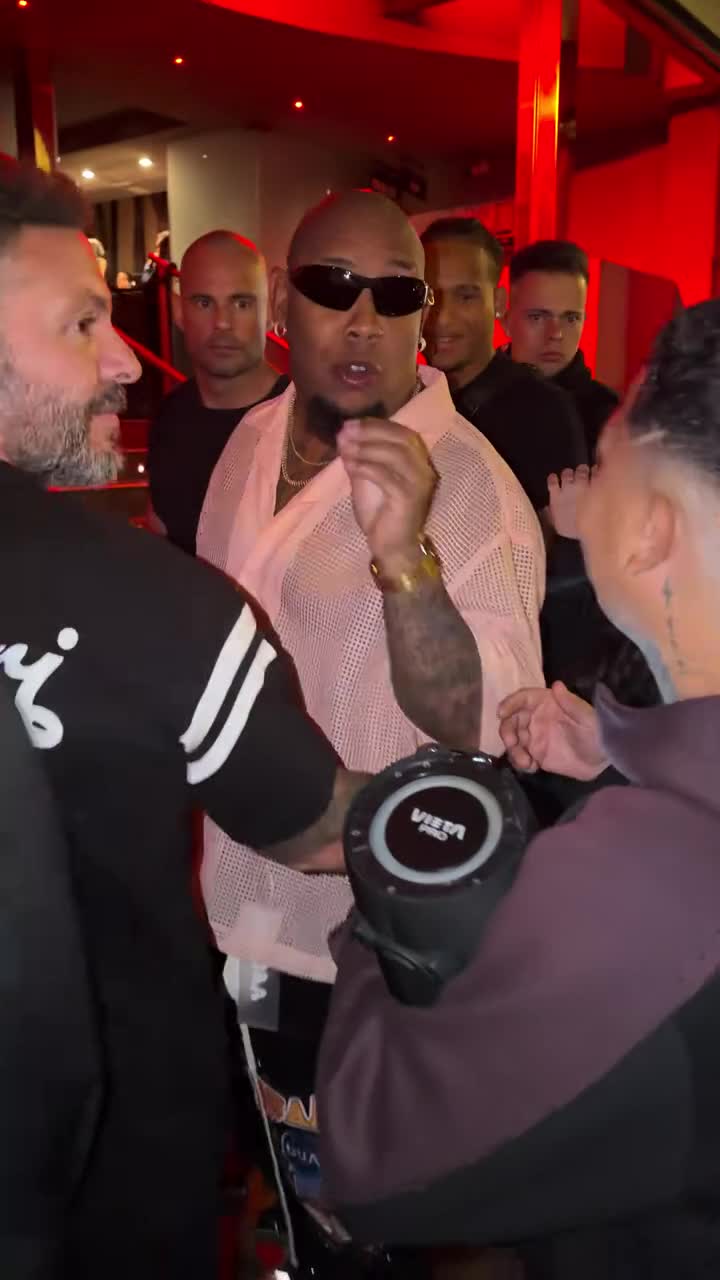
Your photo replaces the central performer wearing sunglasses and a pink shirt. The friends around him stay in the scene. JPG / PNG / WebP · 10 MB each.
Say what to change, what Image 1 or Image 2 supplies, and what to preserve from Video 1.
AI motion and audio may differ from the reference.
15s output · 10s reference · entry quality for each model
Cost comparison only. Output quality and identity consistency are not guaranteed; choose your final settings below.
Use existing credits or buy a one-time pack. No subscription.
Buying credits does not start generation. Confirm here when you are ready. Confirmed failures return credits.
Your uploads and prompt are processed by an AI service. Use only material you have permission to use. Privacy & retention
THE TREND
The Bulin 47 AI trend puts a new face into a lively street freestyle while keeping the friends, handheld camera and performance around it. The familiar setup makes the edit easy to recognize. This preset targets the central performer in the pink shirt and sunglasses, rather than replacing everyone in the group.
The pink-shirted performer in sunglasses is your target. The person holding a phone and the surrounding friends are background participants.
Choose one person with a visible face. You do not need a group photo or a recording of yourself dancing.
Create a separate clip for each person you want to feature. Every new generation uses credits; there is no batch or group replacement in this preset.
Avoid heavy beauty filters, very small faces or several people in the same photo. A front or slight three-quarter view gives more usable facial detail.
The reference includes sunglasses, turns and nearby people. Face details can be hidden, and the model may not preserve every feature.
The default 9:16 frame follows the original street clip. Review hands, glasses and nearby faces before sharing the result.
One. Your portrait replaces the central performer. This preset does not accept a second photo or attempt to replace the entire group.
Yes, as separate paid generations with one portrait per clip. The tool does not automatically create a batch or put multiple uploaded friends into the same scene.
No. The preset already identifies the lead performer and asks the model to preserve the scene, gestures and camera timing. Prompt editing is optional.
The preview plays the source audio. Generated sound may differ by model; Kling output is silent. A credit purchase does not license the song or source audio for your own publication.
No. Reference-guided generation can change facial features, lip motion, glasses or background details. Watch the full result before posting; a successful generation is not a guarantee of a perfect face swap.
The default 10-second MiniMax H3 output at 768P uses 160 credits, including the 10-second reference. The smallest pack is 240 credits for $6.99. Generation is paid; previewing is free. Other settings have their own exact quote shown before you confirm.
Buying credits does not start a video. Return to the saved studio, review the cost and confirm generation. Confirmed generation failures return credits. Photos and prompts stay in a device draft for 30 minutes; submitted files are processed by an AI service.
Photo privacy and retention · Use your own reference in the Genjutsu-style editor
Sources explain the trend and identify the reference. They do not endorse this tool or demonstrate a result made with your photos.
PHOTO-ONLY START
The reference video and prompt are included. Bring your photos.